

Non-Electrical Symbols to PCB
Non-electrical symbols (such as mechanical symbols and marks) are now transferred together when the schematic is converted to PCB, including their associated footprint information and net information, ensuring that non-electrical symbols are correctly transferred in the PCB design.
Feature Entry
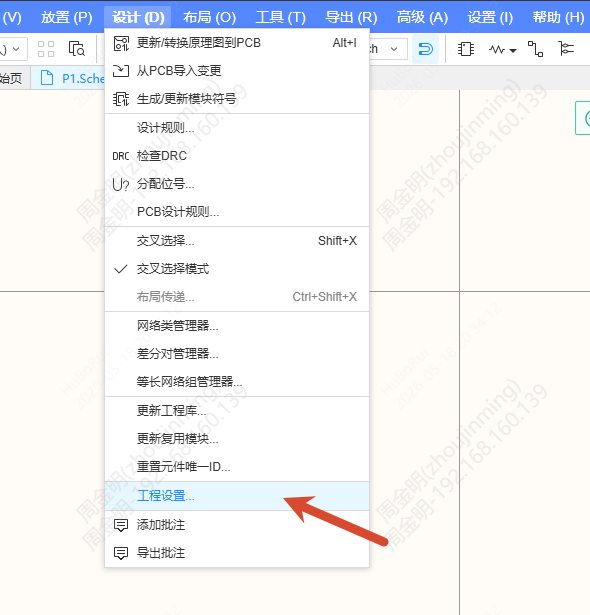
- Top Menu - Design - Project Setting
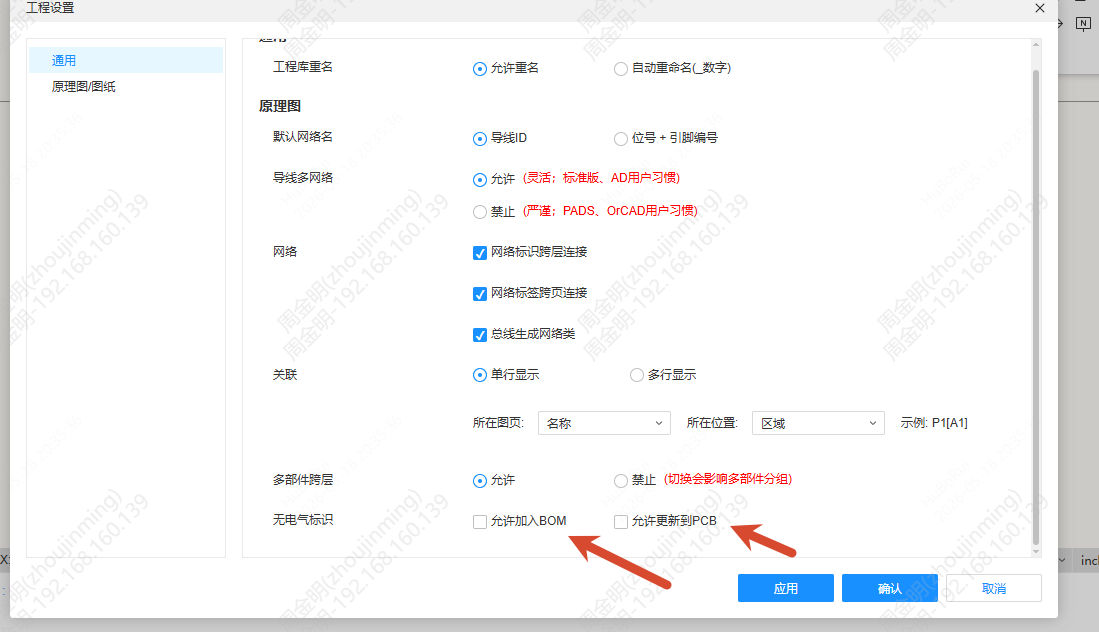
Find the "Non-Electronic Flag" option at the bottom of the settings panel.
Settings
"Non-Electronic Flag" contains the following two sub-items, both unchecked by default:
- Add into BOM Allowed — when checked, non-electronic flags are carried along when the BOM is updated
- Updates to PCB — when checked, non-electronic flags are carried along when the PCB is updated
Steps
- Open a schematic that contains non-electrical symbol components
- Check Updates to PCB under "Non-Electronic Flag"
- Select the non-electrical symbol in the schematic and set its Convert to PCB property to "Yes"
- Click Top Menu - Design - Convert Schematic to PCB
Behavior
Property Display Rules
- When "Add into BOM Allowed" or "Updates to PCB" is not checked, non-electronic flags do not show the "Add into BOM" and "Convert to PCB" properties
Compile Mask Style
When "Add into BOM Allowed" or "Updates to PCB" is checked and the "Add into BOM" and "Convert to PCB" properties of the non-electronic flag are set to No, the component is displayed in the compile mask style.
Two-way Status Update
Two-way status update between the schematic and the PCB is supported:
- Convert Schematic to PCB: supports adding/deleting non-electronic flags in the PCB to the schematic; the changed object is a component, and the Designator property can be added automatically
- Convert PCB to Schematic: supports synchronizing the changes of non-electronic flags in the PCB back to the schematic
Automatic Designator Assignment
When converting to PCB or adding to BOM is allowed in the settings, a Designator is automatically assigned to the non-electronic flag and shown in the tree on the left.
DRC Check
Non-electronic flags take part in the DRC check of components.
Add into BOM
When the "Add into BOM" property of a non-electronic flag is "Yes", it can be added into the BOM.