

Footprint Rule Check
A footprint rule check function is added to the Footprint Editor. It supports checking problems such as the pad distance, pad number and silkscreen overlap inside a footprint, and outputs a check log.
Entry
- Footprint Editor Top Menu - Tools - Footprint Rule Check (located between Check Dimensions and Renumber Pads)
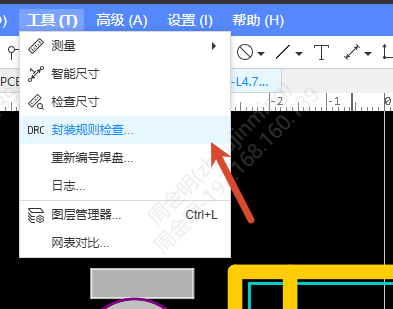
- Footprint toolbar - Footprint Rule Check icon
Steps
- Open a footprint file in the Footprint Editor
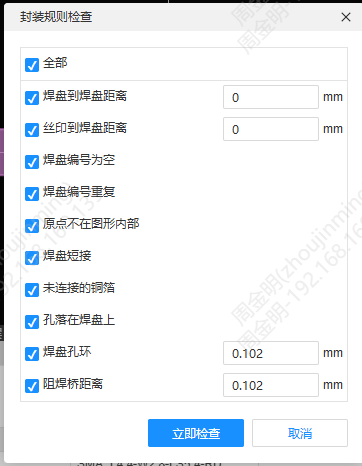
- Click Footprint Rule Check, and the check dialog pops up with all check items selected by default
- Check or uncheck check items as needed, set the parameter values (the parameters follow the canvas unit), and click Check Now
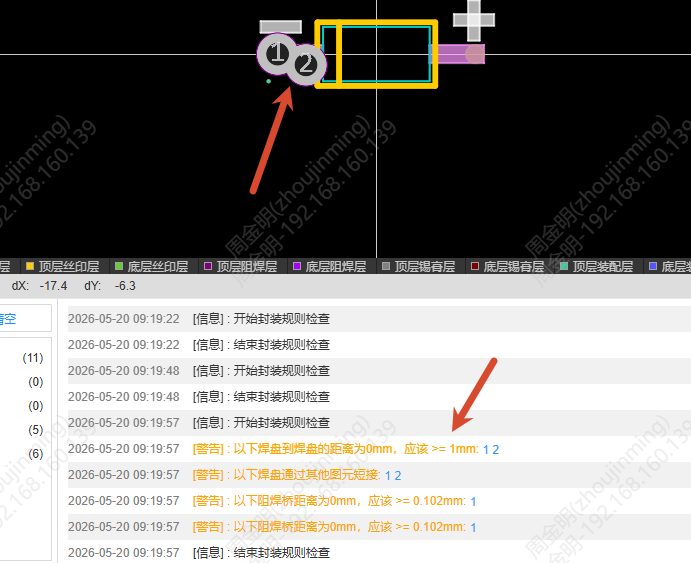
- A real-time progress bar is displayed during the check, and message logs are output at the start and at the end
- When the check result contains items that do not conform to the rules, a warning log is output in the log
The modified check states and parameter values are saved to your user preference and restored the next time the dialog is opened.