

Export PDF
Footprints in the footprint library can be exported directly as PDF files, including the complete view and pad information. The output size is the same as the actual size of the footprint.
Entry
Footprint Editor - Top Menu - File - Export - Export PDF
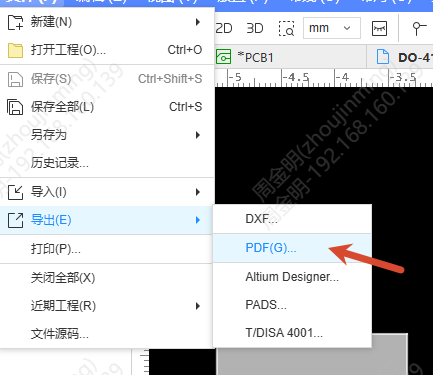
Steps
- Open a footprint file in the Footprint Editor
- Click Export PDF, and the configuration window pops up
- Set the export parameters:
- Layer: Select the layers to be exported, the same as PCB export
- Object: Canvas text is output according to the Text object configuration, and pads are output according to the Free Pad configuration. Content that the footprint does not have is not output
- There are no options such as BOM and Assembly Variants, and the watermark is displayed according to the version
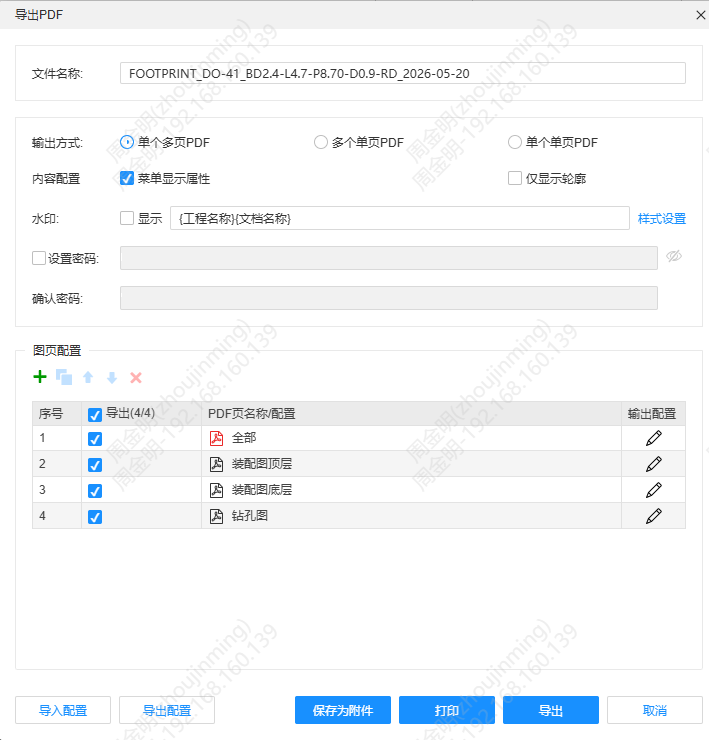
- Click Export to generate a PDF file, and the size of the output content is the same as the size of the footprint