DIMENSION Dimension Tool Set
json
{ "type": "DIMENSION", "id":"UUID", "ticket": 1 }||
{
  "partitionId":null,
  "groupId":0,
  "locked":1,
  "zIndex":2.221,
  "type":"RADIUS",
  "layerId":3,
  "unit":"mm",
  "strokeWidth":0.5,
  "precision":3,
  "textFollow":1,
  "coords": [100 200 300 400 400 400],
}|
["DIMENSION", "e101", 0, 1, 2.221, "RADIUS", 3, "mm", 0.5, 3, 1, [100 200 300 400 400 400]]- type dimension tool
DIMENSION. - id primitive ID, unique within the document.
- ticket logical clock.
- partitionId partition ID it belongs to, null means no partition. Ignored for footprints.
- groupId group ID: 0 no group, non-zero is the group flag, same flag means same group.
- locked whether locked.
- zIndex Z-axis height.
- type dimension type:
RADIUSradius,LENGTHlength,ANGLEangle. - layerId layer.
- unit unit:
mm,cm,inch,mil. - strokeWidth line width.
- precision precision.
- textFollow whether text follows:
1tool automatically decides text position,0always use the position ofATTR. - coords coordinate set X1 Y1 X2 Y2 X3 Y3 ... different dimension types define coordinates differently.
json
["ATTR", "e102", 0, "e101", 1, 200, 150, "VALUE", "1234mm", 0, 1, "SimSun", 50, 10, 0, 0, 0, 2, 15, 1, 1]DIMENSION needs to be accompanied by an attribute with Key VALUE to express the text part of the dimension tool. EDA should ignore unnecessary properties such as whether to display Key and whether to display Value.
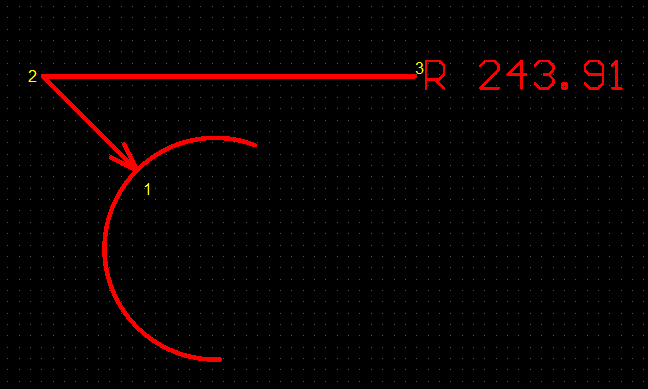
RADIUS Radius Tool
The first coordinate of the coordinate set is the endpoint touching the ARC, and the last coordinate is the default endpoint for displaying text, as shown below.
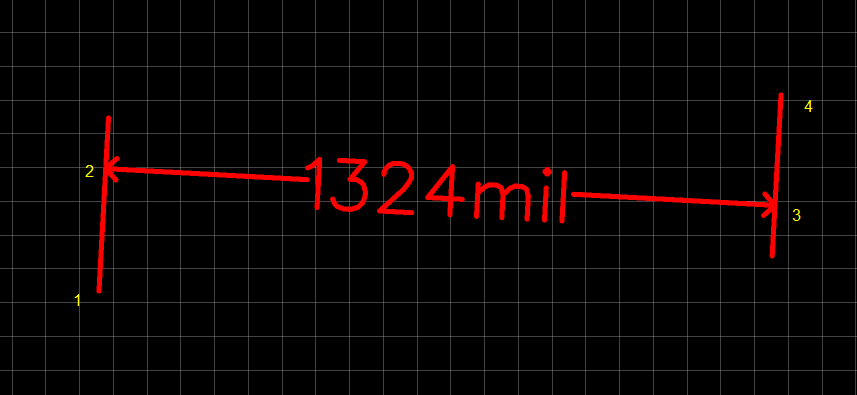
LENGTH Length Tool
The coordinate set only needs four points, as shown below.
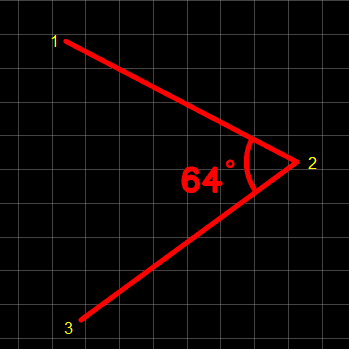
ANGLE Angle Tool
The coordinate set needs 3 points, as shown below.